View Details
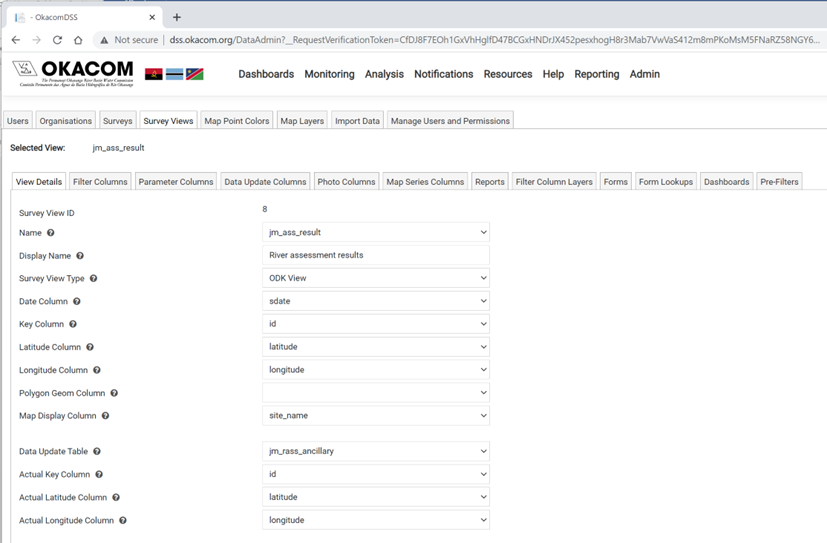
The View Details tab contains all the technical infomation about the data. The information required to configure a survey view is broken into three sections: the basic configuration data, information about the chart, and meta data for the survey view.
Survey view configuration
|
Survey View Names |
Survey View Explanation |
|
Name: |
List of Names of views linked to Postgres/ MSSQL database which 1 is to be selected. (e.g., vw_bio_clarity_tube_v2) |
|
Display Name: |
Titled to be displayed in the survey view dropdown list. (e.g., Water Clarity Monitoring) |
|
Survey View Type: |
Only one Survey view type is available, ODK View. This should be selected |
|
Date Column: |
Name of Postgres/MSSQL view column which stores the date of survey captured. (e.g., submission date) |
|
Key Column: |
Name of Postgres/MSSQL view column which represent the unique identifier of survey captured. (e.g., record_id) |
|
Latitude Column: |
Name of Postgres/MSSQL view column which represent the latitude coordinates of survey captured. (e.g., latitude) |
|
Longitude Column: |
Name of Postgres/MSSQL view column which represent the longitude coordinates of survey captured. (e.g., longitude) |
|
Polygon Geom Column: |
Name of Postgres/MSSQL view column which stores the polygon geometry if data is available. |
|
Map Display Column: |
Name of Postgres/MSSQL view column to display as a title in the map marker popup |
|
Data Update Table: |
Name of Postgres/MSSQL table reference by the selected view. If this is selected, users are able to modify data in the underlying table. (e.g., bio_monitoring_v2_core). Only a single table can be modified in a view, and the key column must be unique |
|
Actual Key Column: |
Name of Postgres/MSSQL column in the data updated table (specified above) which represent the unique identifier. |
|
Actual Latitude Column: |
Name of Postgres/MSSQL column in the data updated table (specified above) which represent the latitude coordinates. If this is selected helps users to move/rearrange the selected GPS coordinate on the MAP tab. |
|
Actual Longitude Column: |
Name of Postgres/MSSQL column in the data updated table (specified above) which represent the longitude coordinates. If this is selected helps users to move/rearrange the selected GPS coordinate on the MAP tab. |
NOTE: All RED highlighted Survey View ID Names are required fields when configuring the View Details Tab for the Survey Views Main Tab.
Chart configuration
|
Survey View Names |
Survey View Explanation |
|
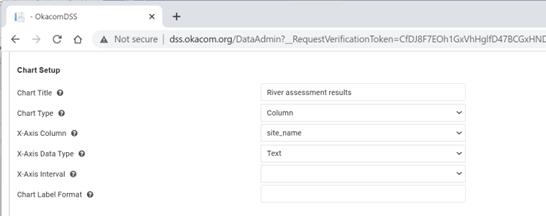
Chart Setup |
|
|
Chart Title |
The heading that will appear on the chart |
|
Chart Type |
Choose between a column, line or pie chart |
|
X-Axis Column |
The field in the data that should be used for the x-axis |
|
Y-Axis Column |
The field in the data that should be used for the y-axist |
|
X-Axis Data Type |
The data type of the x-axis should be one of Date, Numeric, or Text |
Metadata
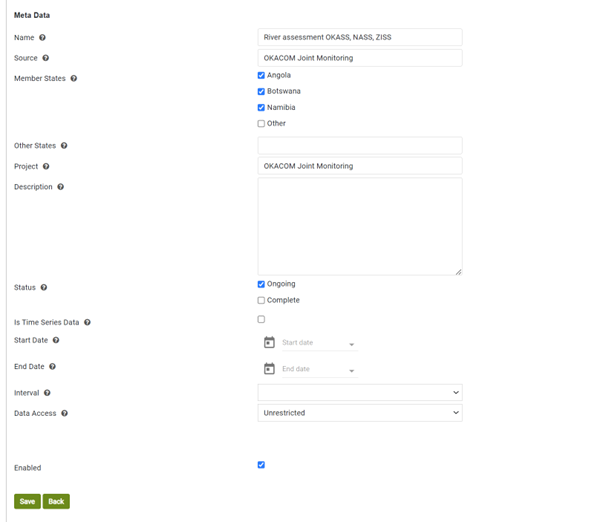
The metadata is used for display purposes on the presentation screen.
|
Survey View Names |
Survey View Explanation |
|
Name |
The name of the survey from which the data is displayed |
|
Source |
The source of the data |
|
Member States |
The Member States involved in the survey |
|
Other States |
Any other states involved |
|
Project |
The name of the project if there is one |
|
Status |
Is the project complete or ongoing |
|
Is Time Series Data |
Is the data a time series |
|
Start Date |
If it is a time series, capture the start date |
|
End Date |
If it is a time series capture the end date |
|
Interval |
The time series interval should be captured as daily, weekly or monthly |
|
Data Access |
Is the data restricted, or available for general access |
|
Enabled |
Clicking the box will make the survey visible in the application |
Created with the Personal Edition of HelpNDoc: News and information about help authoring tools and software